Walking without internet
How do I prepare Walkable before travelling?
Short answer
Download the offline map region covering your destination while you still have wifi. Once it is on the phone, Walkable plans routes, draws the map and guides you there with no signal and no roaming data.
Updated · 3 min read
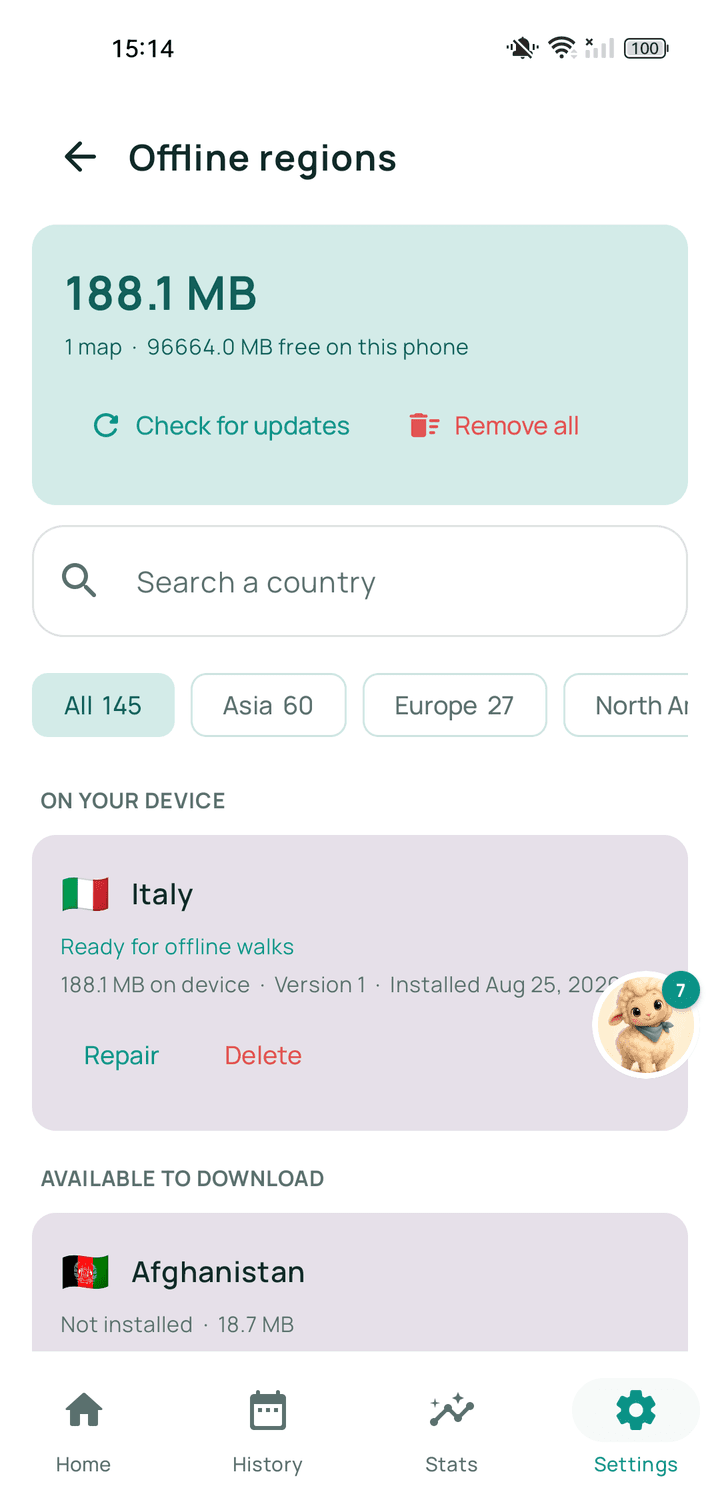
Step by step
- Do it on wifi, at homeMap regions are large. Downloading one on mobile data abroad is the expensive way to learn this.
- Open the offline maps screenFind it in Walkable's settings.
- Choose the region covering your destinationRegions are areas rather than single cities, so one usually covers a whole trip.
- Let it finish completelyA partly downloaded region is not usable.
- Test before you goPut the phone in aeroplane mode and ask for a short route in that area. If a route appears, you are ready.
What happens next?
At your destination you can plan and follow walks with the phone in aeroplane mode. Your walks record and save exactly as they do at home.
Related guides
- What are offline regions?Downloadable packages of map and path data that let Walkable work with no signal.
- Can I use Walkable without internet?Yes. Prepare an offline map for your area first, and Walkable plans, guides and records with no signal.
- The map is grey or not loadingNo connection and no offline map for that area. Your walk is still recording.
Was this helpful?
Nothing is sent or recorded — this only changes what you see next.
Feedback about the guide: How do I prepare Walkable before travelling?Still stuck? Contact Walkable Support or ask the Community.