Walking without internet
Can I use Walkable without internet?
Short answer
Yes. Recording a walk never needs a connection. Maps and route planning work offline too, as long as you have prepared an offline map for that area beforehand — Walkable then plans and guides entirely on the phone, even in aeroplane mode.
Updated · 3 min read
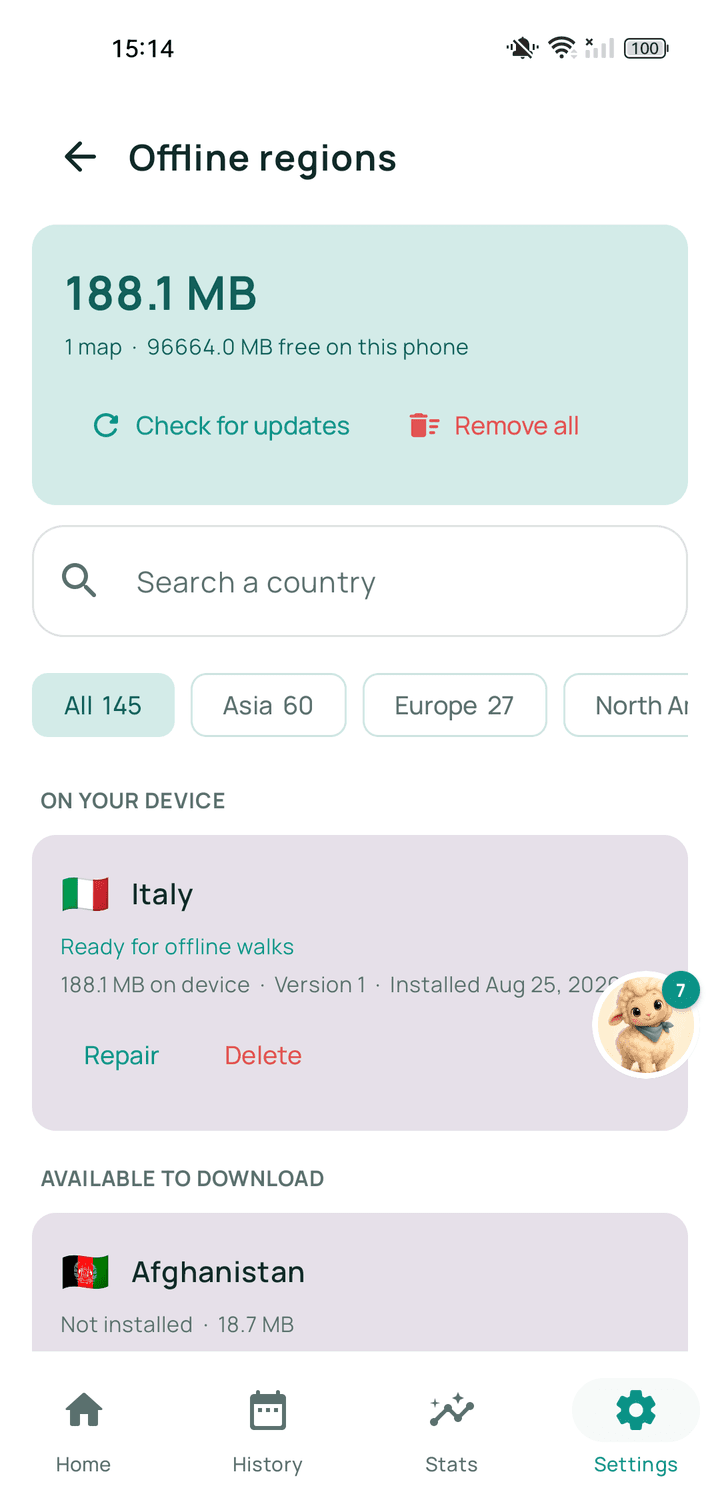
The one thing to do in advance
Offline walking depends on one preparation step: downloading the map for the area you are going to, while you still have a connection. Once that map is on the phone, Walkable stops needing the internet for that area.
This is the whole trick, and it is the thing people discover too late. A phone with no signal and no prepared map can still record a walk, but it cannot draw a map or plan a route.
Why routing works offline at all
Many walking apps ask a server to calculate a route. Walkable calculates it on the phone, using the downloaded map data. That is why a planned route appears in aeroplane mode as readily as on wifi — nothing is being asked of anybody.
Step by step
- Before you leave, while you still have a connectionOpen Walkable's offline maps screen and prepare the region covering where you are going.
- Wait for it to finishThe download can be large. Use wifi and let it complete.
- Check it is readyThe region should show as available on the phone rather than as a download.
- GoYou can now plan, follow and record walks in that area with no signal at all.
What happens next?
In a prepared area, Walkable behaves the same offline as online: the map draws, routes are planned on the phone, guidance speaks, and the walk is recorded and saved locally.
Common problems
The map is grey where I am walking
That area is not covered by a prepared offline region and there is no connection to fetch it live.
No route can be created
Route planning needs either a connection or a prepared offline map for that area.
Related guides
- What works offline?Recording always. Maps, route planning and guidance too, in a prepared area.
- What are offline regions?Downloadable packages of map and path data that let Walkable work with no signal.
- How do I prepare Walkable before travelling?Download the offline map for where you are going, on wifi, before you leave.
Was this helpful?
Nothing is sent or recorded — this only changes what you see next.
Feedback about the guide: Can I use Walkable without internet?Still stuck? Contact Walkable Support or ask the Community.